

Overview
Where is Firefox cache? How to increase Firefox cache? This article attempts to answer these two (2) simple questions.
Where is Firefox cache? Step 1

Type “about:cache” into the Firefox URL box (Red Circle) as shown above.
Where is Firefox cache? Step 2

Look down, select the path next to “Cache Directory” and copy it.
Where is Firefox cache? Step 3
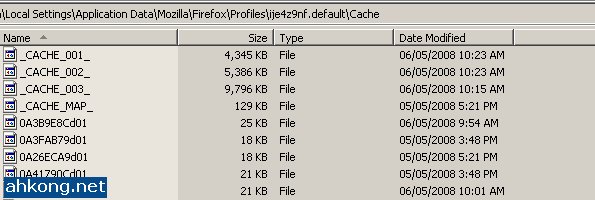
Paste the path into Windows Explorer. Note that the files in the Firefox cache are not named properly thus it can take quite some time to find a particular file. Larger files such as .flv or .swf might be easier to find compared against .jpg image files.
How to increase Firefox cache? Step 1

Click “Tools” then select “Options” and click it to open up the Options Menu Window.
How to increase Firefox cache? Step 2
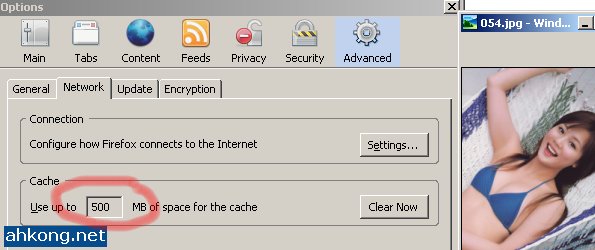
Change the figure in the box (Red Circle) to anything higher than 50 (default cache size is 50MB) then click the “OK” button and the Firefox cache size will be increased accordingly.
Deimos’s Daily Reads
Check out this new trailer of the Incredible Hulk, courtesy of BaseGuardian.
Deimos’s Thoughts
Though every Firefox user ought to know this, Deimos believes that there could be some Firefox users that have yet to know this. Deimos has been using Firefox for quite some time before he knew where is to find the Firefox cache and how to increase it.
Deimos Asks
Do you know where is the Firefox cache and how to increase it?


5:34 am
Firefox HACK - How to increase Firefox Cache! | zedomax.com - Obsessively profiling DIYs, Hacks, Gadgets, Tech, Web2.0,and beyond.
said the following:
[…] friend Deimos over at AhKong.Net posted an interesting post today about how to utilize the file cache of Firefox. By use of more […]
7:52 am
Marcus Hochstadt
said the following:
Thanks for the info, mate. Will increase mine and see if I can drop faster that way… 😉
~Marcus
7:57 am
Deimos Tel`Arin
said the following:
@Marcus Hochstadt:
I just figured that out recently, thought it would be nice to share. 😛
9:23 am
kljs
said the following:
Why do you need to increase the cache in the first place?
9:28 am
Deimos Tel`Arin
said the following:
@kljs:
Well, I need to stream certain videos that are quite large and explicit. 😡
12:37 pm
joshuaun
said the following:
I did this b4………but the effect is not so direct………sigh ❗
12:56 pm
BaseGuardian
said the following:
Thanks for sharing, it will be helpful.
1:12 pm
Deimos Tel`Arin
said the following:
@joshuaun:
What do you mean by the effect is not so direct? 😳
=========================================================
@BaseGuardian:
You are welcome! 💡
=========================================================
2:13 pm
kljs
said the following:
explicit? heheheheheehe…… *evil thoughts*….
2:21 pm
bendz
said the following:
I wish I had a PC with much greater specs. I just have 40 gig hard drive and I don’t have plans f upgrading it and I only have about a gig left. Changing my cache size would be futile >.<
3:12 pm
Deimos Tel`Arin
said the following:
@kljs:
You know, I know, can liao lor. Sssssssh. 😆
=========================================================
@bendz:
40 gigs? You are so totally in need of a hard disk with much much more gigs! 😮
=========================================================
4:04 pm
kljs
said the following:
Yeah….. I know lar…… 😉
7:13 pm
iCalvyn
said the following:
great, this is a good tips, my cache contain a lot of entries, after clear, wow…
12:00 am
joshuaun
said the following:
means not very big different………..maybe i’ll try one more try=)
1:44 pm
Deimos Tel`Arin
said the following:
@kljs:
Good! 😉
========================================================================
@iCalvyn:
But I am not teaching anyone how to clear their cache wor. 😐
========================================================================
@joshuaun:
What kind of differences were you expecting in the first place? 😯
========================================================================
2:02 pm
kljs
said the following:
I guess people are expecting faster website loading and such…… well, having a bigger cache only allow you to cache more webpages, doesn’t mean caching will help you load the page faster………..or something like that…
3:03 pm
dicky
said the following:
Hi, if i type “about:config” and add a “browser.cache.memory.capacity”, then set the value to a very large value, will it helps? I try on my own PC, seems like working well…
4:36 pm
Apple
said the following:
Good info. Digged and Delicioused.
11:41 pm
Firefox secrets | Tech,Web,How to,Review,Tips,Downloads,Life and Make Money and Mooney Online
said the following:
[…] Name: about:cache (ahkong blog about it before) Function: Cache Information Mozilla developed a nice way to view files that […]
2:18 am
Firefox cache – nastavitev – pohitritev | T&R splet - internetne storitve
said the following:
[…] Vodič s slikami s prikazom kje se nahaja vaš Firefox cache […]
12:19 am
Marcelo
said the following:
thanks .. idk if this will help but.. i will try bye….