

Overview
Max has developed his Site Hoppin Tool Bar and it is now currently available for Private Beta Testing. Deimos has an invitation code that he would like to share, for those who are interested in beta testing the Site Hoppin Tool Bar.
Site Hoppin Tool Bar – Official Download Page
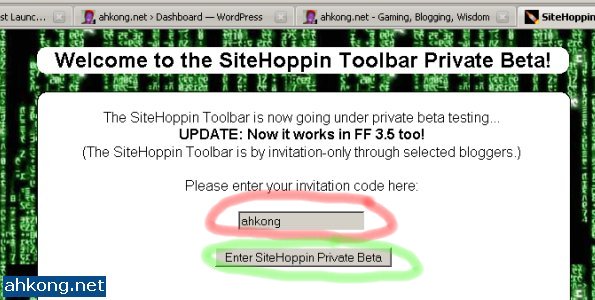
Visit the official download page and type in the invitation code “ahkong” in the input text area (red circle) and then click the “Enter SiteHoppin Private Beta” button (green circle) to proceed.
Site Hoppin Tool Bar – Accept Agreement, Download and Install
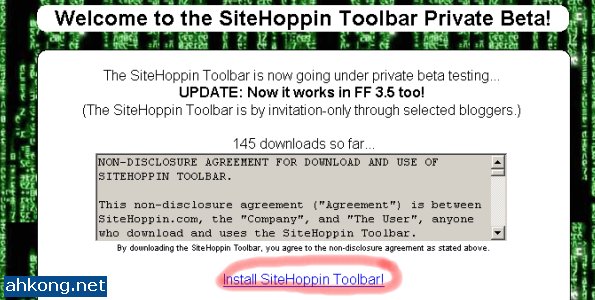
Click the “Install SiteHoppin Toolbar!” link (red circle) to continue.
Site Hoppin Tool Bar – FireFox – Allowed Sites

Add sitehoppin.com as “Allowed Sites” to continue, click “Edit Options” button (Red Circle).
Site Hoppin Tool Bar – FireFox – Allowed Sites
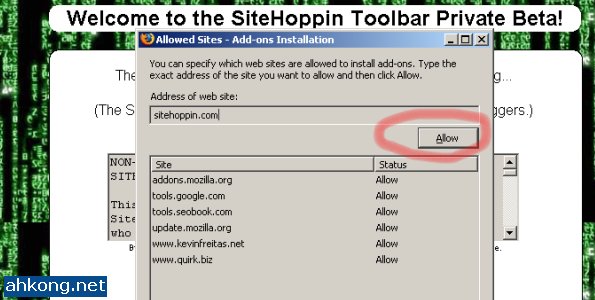
Click the “Allow” button (Red Circle).
Site Hoppin Tool Bar – FireFox – Allowed Sites
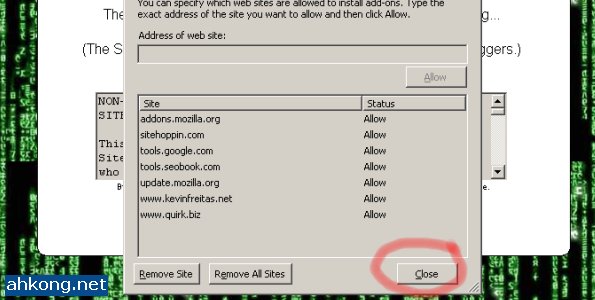
After adding sitehoppin.com to Allowed Sites, click “Close” button (Red Circle) to continue.
Site Hoppin Tool Bar – Installation
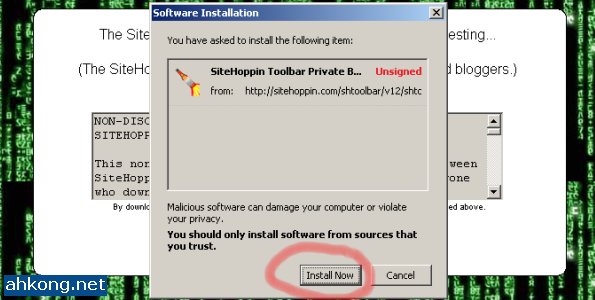
Now click the “Install SiteHoppin Toolbar!” link and this window should pop up, then click the “Install Now” button (Red Circle) to install the Site Hoppin Tool Bar.
Site Hoppin Tool Bar – Installation Completed
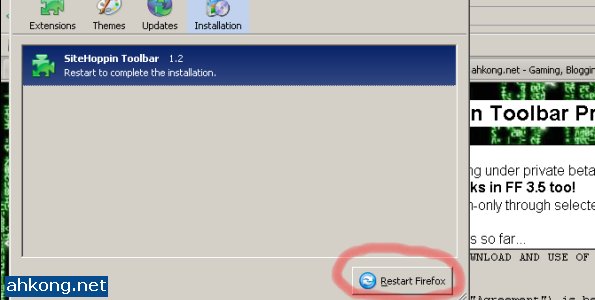
FireFox must be restarted after the Site Hoppin Tool Bar has been installed, click the “Restart Firefox” button (Red Circle) to restart FireFox now or you can do it later.
Site Hoppin Tool Bar – Big Buttons bothering you?

Are the buttons too big? Right click on the Site Hoppin Tool Bar area, select and click “Customize” button (Red Circle) to change that.
Site Hoppin Tool Bar – Use Small Icons

Check the box (Red Circle) beside “User Small Icons” and click “Done” button (Green Circle).
Site Hoppin Tool Bar – Rate Sites with Hot Keys

If you are a registered user of Site Hoppin, you can rate sites with the ALT + (1-5) hot keys. The above image (Red Circle) shows that you have yet to rate this site.
Site Hoppin Tool Bar – Rated Site

This image (Red Circle) shows that you have given the site a 5/5 rating,
Site Hoppin Tool Bar – Site Hop to other sites

Click the Site Hoppin Button (Red Circle) or press ALT + ` or CTRL + ` and you will be “hopped” to another site registered in the Site Hoppin Database.
Site Hoppin Tool Bar – Sites that are yet to be rated

The image (Red Circle) shown above means that this site has not been rated before.
Site Hoppin Tool Bar – Rate, Comment a site via Site Hoppin
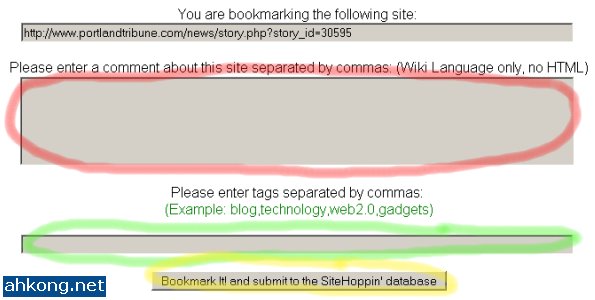
This window will pop up if you try to rate it. Enter your comments (Red Circle) and tags (Green Circle) respectively and click the button (Yellow Circle) at the bottom to continue.
Site Hoppin Tool Bar – My Browsing Space is reduced! How to fix it?

Just hide the Site Hoppin Tool Bar when not in use. Right click, select and click “Site Hoppin Tool” button (Red Circle) to hide the SIte Hoppin Tool Bar.
Site Hoppin Tool Bar –

Viola! No more Site Hoppin Tool Bar!
Deimos’s Daily Reads
Do you have a perfect job? Louise shared her thoughts about perfection with us.
Deimos’s Thoughts
The new Site Hoppin Tool Bar allows Deimos to take in Beer Credits faster than ever, though Deimos is happy with this, knowing this also concerns him to a certain extent.
After a chat with Max, Deimos is grateful that there are more unregistered Site Hoppin guests than registered Site Hoppin users.
Deimos Asks
Have you heard about Site Hoppin already? Wanna help beta test the Site Hoppin Tool Bar?


12:29 pm
dicky
said the following:
Eh, i felt this toolbar similar with StumbleUpon toolbar, right? Btw, i will go through it when i free and install if i interest. Do i need an account?
12:57 pm
Deimos Tel`Arin
said the following:
@dicky:
Never used Stumble Upon Tool Bar before so I have no idea. 😐
You need an account if you want to earn Beer Credits. 🙂
4:24 pm
vickie
said the following:
erm.. StumbleUpon toolbar is very powerful
4:43 pm
Deimos Tel`Arin
said the following:
@vickie:
Really? I don’t like how it made my browsing space lesser though. ➡
5:00 pm
BaseGuardian
said the following:
My browser got to many toolbar already ❓
10:40 pm
Canucklehead
said the following:
Hey – it’s Canucklehead (at work). Just thought I’d stop by and see the banner. Wow! You really gave me a place of honour. Anyway, I wish I was better at designing banners but it looks okay – thanks SO much once again.
😆
9:34 am
kljs
said the following:
My browser don’t have any toolbars….. 😉
heheeheh….. maybe I will try to buy some beer when I get my salary increment…… hopefully……
1:25 pm
Deimos Tel`Arin
said the following:
@BaseGuardian:
Cut down the clutter, kill some Tool Bars! Or hide / disable them. 🙄
=========================================================
@Canucklehead:
You are welcome! Thanks for stopping by. 💡
=========================================================
@kljs:
Buy Beer Stocks? Remember to buy from my affiliate link yo! 😡
=========================================================
2:15 pm
kljs
said the following:
Sure will….. once I get the extra money lar…. hopefully….
7:07 pm
Steve Yu
said the following:
Thanks for the detailed explanation. Sitehoppin is quite similar to SU. You should try SU, will bring you extra traffic. 😆
1:53 pm
Deimos Tel`Arin
said the following:
@kljs:
Well, you better hurry. The price is going to be increased by the end of this month. 😮
==============================================================
@Steve Yu:
My Stumble Upon account got banned so I am not a great fan of them. ➡
==============================================================
2:10 pm
kljs
said the following:
Then no chance lar….. my salary won’t increase this month….. sigh…..
12:48 pm
lankapo
said the following:
Deimos,
Can pay use Maybank2u or not for Beer Stocks ?hehe 😆