

Installed Alexa Tool Bar – Sparky and Search Status Extension yet?
14 Jan 2008 | The Blogsphere, Useful | 29 comments
Overview
Find out a little bit more about the Alexa Tool Bar – Sparky as well as Search Status Extension, if one has yet to know about these two (2) particular useful Firefox Add-on for fellow Blog Masters and Web Masters alike. Blog visitors or readers who wish to support their favorite sites are also recommended to install the Alexa Tool Bar – Sparky.
Alexa Tool Bar – Sparky
Alexa only records site visits and page views if the browser has Alexa Tool Bar installed, for fellow Blog Masters and Web Masters seeking to achieve a higher Alexa Traffic Ranking, why not let those visits and page views count?
Besides that, it is also very handy in knowing any particular site’s Alexa Traffic Ranking.
Download it here:
https://addons.mozilla.org/en-US/firefox/addon/5362
Search Status Extension
Appears to have more functions than the Alexa Tool Bar – Sparky, this one also shows the Page Rank of the site. One of the features is – able to highlight the no follow links, so one is able to know whether those dofollow sites are really indeed dofollow.
Download it here:
http://www.quirk.biz/download-searchstatus
Browser’s viewing space totally unaffected
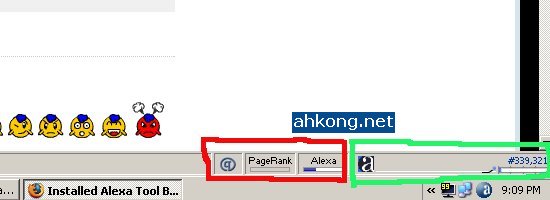
Please note that the Alexa Tool Bar – Sparky and Search Status Extension are totally not tool bars that “jams up the browser” unlike most tool bars.
Legend – Red: Search Status Extension | Green: Alexa Tool Bar – Sparky
Does not consume much extra memory
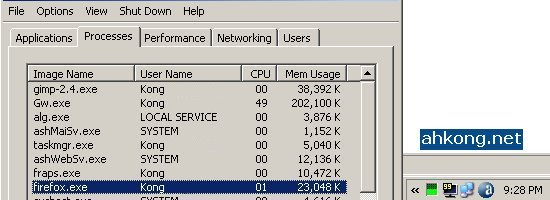
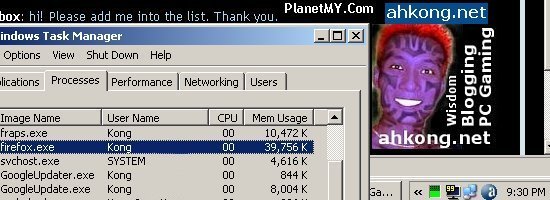
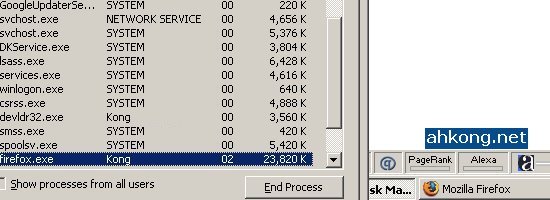
From the following screenies, it appears that the memory consumption appears to be the same after the installation of Alexa Tool Bar – Sparky and Search Status Extension.
=====================================================================
Before installation – Blank Page
______________________________________________________________________________
Before installation – ahkong.net
=====================================================================
After installation – Blank Page
______________________________________________________________________________
After installation – ahkong.net
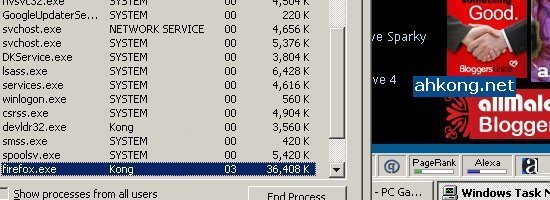
=====================================================================
Source
http://www.dotsauce.com/2007/12/30/5-essential-firefox-addons/
https://addons.mozilla.org/en-US/firefox/addon/5362
http://www.quirk.biz/download-searchstatus
Deimos’s Thoughts
First, I would like to express my thanks to goldfries as it was him who introduced me to Search Status Extension via a reply in this particular article about Alexa Traffic Ranking.
Second, kudos to Saphrym for mentioning DotSauce’s linkie which allowed me to chance upon such an interesting screenie of Firefox.
Deimos Asks
So, fellow bloggers (who is eager to rise up the Alexa Traffic Ranking), have you heard of Alexa Tool Bar and Search Status Extension?
Installed it already? 
Site visitors and or readers (if any), would you be bothered to install this? 
Deimos’s Additional Reads
Deimos basically grew up with computers and software as he started using computers at the age of nine. However, he is a stringy mofo and only use those anti virus software which are freely obtainable off the internet. He does not use any web server software as he is a gamer, not a programmer. Some software tools such as GIMP did come in handy to manipulate images though. Filezilla would be a useful software to upload files and this is what he uses to upload files to his file server, while a local web hosting firm was engaged to host his files for his blog. Sometimes he blogs in Star Bucks via the wireless internet services provided there.


4:25 pm
Moolahking
said the following:
Hey..!! I want to be that cat..!!!
Nice Tools..But does it applicable using Mozilla?
4:42 pm
Deimos Tel`Arin
said the following:
@Moolahking:
Did ya notice the Firefox logo resembles the cat curled up in there? 😆
Do you mean the Mozilla browser? 💡
For Search Status Extension or Sparky? 😕
5:07 pm
moolahking
said the following:
Oppsss.. Soory.. ❗
I mean does only applicable using Mozilla? How about IE?
5:20 pm
Deimos Tel`Arin
said the following:
@Moolahking:
Oh! I think it is only applicable to Firefox or Mozilla. 💡
Does not work with Internet Explorer I guess. 🙂
9:51 pm
soundtrackgeek
said the following:
Woo, all these toolbars! I have 4 installed now, including Sparky. I think I need a larger monitor 😀
10:00 pm
Deimos Tel`Arin
said the following:
@soundtrackgeek:
I only have Sparky and Search Status Extension. 😛
11:19 pm
FLoReNcE
said the following:
Oh..i think the cat is the lucky one!!! I want to be that cat too. 😆
8:31 am
Deimos Tel`Arin
said the following:
@FLoReNcE:
I think the cat is suffocating! 😆
10:44 am
Wayne Liew
said the following:
I knew about all these but I only have the StumbleUpon toolbar installed. I don’t like tonnes of toolbars jamming my browser since the page I am viewing will be squeezed!
Trust me, get one article stumbled (mail me one great article of yours that you think is worth stumbling and hopefully, I can show you the traffic effect) and your Alexa ranking will go up wildly.
4:39 pm
yung .
said the following:
Will installing this toolbar slowdowns your pc, cos my pc ram is really limited..
11:12 pm
Deimos Tel`Arin
said the following:
Article updated. 😳
========================================================
@Wayne Liew:
Installing Sparky and Search Status Extension does not jams up the browser. 😉
========================================================
@yung .:
Looking at the memory used before and after installation, I say it would not slowdown the PC. 💡
========================================================
5:18 am
Boost Alexa Traffic Rank | ahkong.net
said the following:
[…] visitors and readers to install it too, for more information please visit the following linkie: ahkong.net/installed-alexa-tool-bar-sparky-and-search-status-extension-yet Download the ZIP Archive here: […]
7:24 am
PostOnFire.com
said the following:
Installed Alexa Tool Bar – Sparky and Search Status Extension yet?…
Bloggers eager to climb the Alexa Traffic Ranking, installed Sparky yet?
Make your own visits to your site count!
Alexa only records site visits / page views if the browser has the Alexa Tool Bar – Sparky installed.
Sparky does not jams up Firefox…
6:08 pm
Zath
said the following:
I’ve been using Search Status for quite a while now and think that’s definitely worth having for the features you mentioned about, plus it also works out some neat little SEO stuff like % keyword usage on the page.
6:37 pm
Deimos Tel`Arin
said the following:
@Zath:
Hello there! 🙂
W00t! I did not realize such feature exist! 😆
Guess I only use it to check the site’s Page Rank. 😛
Did you have the Alexa Tool Bar – Sparky installed? 💡
10:21 pm
Entrecarder Survival Guide | ahkong.net
said the following:
[…] Most Recommended Firefox Add on Alexa Tool Bar – Sparky, highly recommended to install it into one’s Firefox. More information regarding Alexa Tool Bar – Sparky, check out the following linkie: ahkong.net/installed-alexa-tool-bar-sparky-and-search-status-extension-yet […]
11:30 pm
Zath
said the following:
I always thought that if you had Search Status you didn’t need another Alexa toolbar or extension since Search Status sends that info of sites you visit to Alexa anyway?
From reading the FAQs for Search Status, I think it does do the job of a separate Alexa toolbar/extension too.
4:34 am
Deimos Tel`Arin
said the following:
@Zath:
Yeah it does. 😛
Guess I like seeing the rank numbers straight away without needing to hover my house over there. 😆
5:06 am
Zath
said the following:
Try right clicking on the Alexa part of Search Status and selecting “Show as Text” and you’ll have the rank in numbers shown, is that what you mean?
5:11 am
Deimos Tel`Arin
said the following:
Duh! ➡
Hell yeah! 😆
I guess I can uninstall Sparky now. ❗
Then again, maybe I’ll just leave it as that. 😛
6:56 am
Eight Totally Tested Proven Methods to Improve Alexa Traffic Ranking | ahkong.net
said the following:
[…] Here are some Alexa related articles that Deimos wrote up: http://ahkong.net/boost-alexa-traffic-rank/ http://ahkong.net/exploit-alexa-ranking-with-entrecard/ http://ahkong.net/installed-alexa-tool-bar-sparky-and-search-status-extension-yet/ […]
9:40 pm
Jennie
said the following:
Hi Deimos! your blog page has lots of valuable information. I love it here! I rated you “10,” just so you know. 🙂
Best Regards! 🙂
p.s. I’m a newbie w/all these things with regards to blogging. But the information you have here all sounds interesting that I hope to be able to get around to doing. Do start off, I just downloaded the sparky. I hope it works out for our two month old blog. Appreciate you site.
10:06 am
Deimos Tel`Arin
said the following:
@Jennie:
Thanks for the support and feedback yo! 😳
2:26 pm
Djyano
said the following:
I’ve been using Search Status and Alexa Tool Bar – Sparky for quite long time already, but since I’ve update firefox 2 to firefox 3.
All my bookmarks and extensions were deleted. Haha, luckily i put your link in my blog and what a coincidence, this article provide Search Status and Alexa Tool Bar – Sparky link and i am able download them back.
Guess this will save my time 🙂
Good article, haha, maybe i will write a post on how to transfer your firefox 2 data to firefox 3 😛
4:55 am
Namelesswonder
said the following:
…Doesn’t work for Explorer? ._.
4:56 am
Namelesswonder
said the following:
Damnit…it won’t… ›.›
8:13 pm
toy grills
said the following:
¡Gracias!
10:32 pm
chattekiler
said the following:
I’ve been using Search Status and Alexa Tool Bar – Sparky for quite long time already, but since I’ve update firefox 2 to firefox 3.
11:01 pm
S.M.J.Z.H.
said the following:
Hi,I’m fine….
ARE YOU OK???